Combos, Kit or By quantity: which bundle type to use
A guide to choosing the bundle type based on your commercial goal and your operations.
Why choosing the right type matters
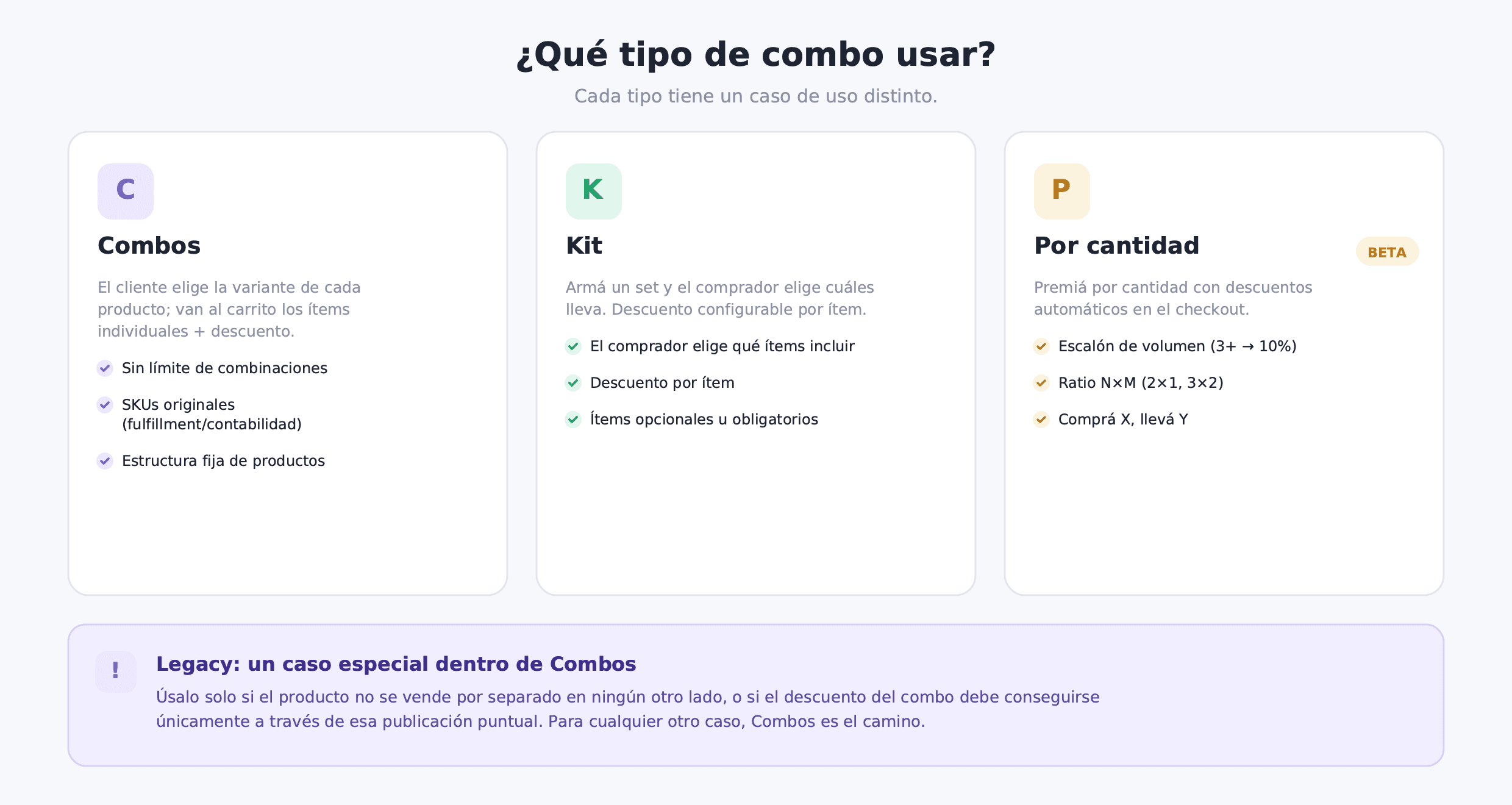
Bundle offers three bundle types: Combos, Kit, and By quantity. These are not variations of the same mechanism: they are distinct tools with distinct logic. Choosing the wrong type does not just complicate setup — it can create a shopping experience that does not match what your customer expects or what your operations can handle.
There's also Legacy, a special case inside Combos for two very specific scenarios — covered in detail below.
This guide breaks down each type: how it works, what its technical limits are, and when to use it.
The three types at a glance
| Type | What the shopper picks | What goes to cart | Discount | Variant limit | Ideal for |
|---|---|---|---|---|---|
| Combos | The variant of each product in a fixed structure | Individual products + automatic discount line | Bundle-level | No limit (size×color, flavor×size) | Fixed structures with many variant combinations |
| Kit | Which set items to include (opt/req) + variant + qty | Selected items + per-item discount at checkout | Per item (individual) | Fixed or choosable per element | Made-to-order sets, main product + optional extras |
| By quantity (BETA) | Nothing explicit: buys the qualifying quantity | Eligible products + automatic discount at checkout | By quantity/volume or buy X get Y | Per product | Wholesale, 2-for-1, clearing stock, buy X get Y |
Combos
Combos has a fixed product structure, but the shopper chooses the variant of each item. If you set up a "shirt + pants" bundle, the shopper picks the size and color of the shirt, and the size and color of the pants. Individual SKUs go to the cart with a discount line applied automatically at checkout.
The major advantage of Combos is that it has no variant limit. You can combine size x color x length on each product without hitting TiendaNube's limit, because the logic lives in Bundle, not in the TiendaNube product. That makes it perfect for fashion (size x color), sports supplements (flavor x size), cosmetics (skin type x presentation), or any category where variants multiply.
Because original SKUs go to the cart (no new combo product is created), your fulfillment sees the real products. No mappings, no special reconciliations. The difference from a Kit is that in Combos the structure is fixed: every shopper gets the same products (shirt + pants); no one can skip an item from the bundle.
Legacy: a special case inside Combos
Combos creates a real product in TiendaNube for every variant combination the shopper can build. In a couple of very specific cases, though, you're better off with a single bundle product that has its own SKU and stock synced to the components — that's Legacy.
Legacy is the exception, not the default. It only makes sense in two scenarios: (1) you have products you don't offer separately anywhere else in your catalogue — the jacket with the inner lining is always that bundle, never sold apart —, or (2) you want the bundle discount to only be available through this specific listing, so the shopper can't buy the individual products elsewhere and get an equivalent discount. Outside those two cases, the regular Combos structure is the way to go: it keeps your products sellable on their own, without creating a new SKU or a shared stock pool to sync.
The technical limit also works against Legacy: TiendaNube supports up to 3 variant axes and approximately 1,000 combinations per product. If your bundle has size, color, and length, hitting that limit is easy. In that case, Legacy no longer scales: you need the regular Combos structure.
Kits
A Kit gives the shopper control over which items from the set to include. The structure is not fixed: you have mandatory elements (which always go in) and optional ones (which the shopper adds or not). Each element has its own minimum and maximum quantity, eligible variants, and per-item discount. Selection limits (minimum and maximum items) control how many elements the shopper must choose for the kit to be valid, and how many receive the discount.
A Kit is the right tool when you want the shopper to curate their own selection from a curated set. The most typical case is "main product + optional extras": the shopper definitely takes the anchor item, and the extras are optional additions with an individual discount. It also works for gift builders (the shopper picks N of M products), made-to-order sets (3 books from a selection of 10), or any experience where choosing the items is part of the value.
Like Combos, the Kit sends original SKUs to the cart. The landing product that Bundle creates in TiendaNube is just the storefront entry point; it does not go to the cart or create a combo SKU. When the kit is paused, that landing product returns a 404.
For a full explanation of the Kit type, see What is a product Kit and when to use it.
By quantity
By quantity is currently available in BETA. It is the bundle type where there is no explicit selector in the storefront: the discount is applied automatically at checkout when the shopper meets the quantity or product combination condition.
It has three modes:
Volume tier. You configure between 2 and 6 discount tiers by quantity: for example, 3 or more units → 10%, 5 or more → 20%, 10 or more → 30%. The shopper adds units and the discount is calculated automatically.
N×M ratio. For every N units, M go at a discount or free. The most common case is 2-for-1: the shopper adds 2 units of the same product and the cheapest one goes free. You can also configure 3×2 or other ratios.
Buy X get Y. Trigger products (the ones the shopper must buy) unlock reward products (the ones that receive a discount or go free). Useful for cross-category promotions: "buy 2 shirts and get a hat at 50% off."
By quantity does not create a separate landing product or require the shopper to interact with a selector. It is fully automatic at checkout. That makes it ideal for stock clearance (where you want the shopper to load up more units without friction), wholesale pricing with tiered discounts, or 2-for-1 seasonal promotions.
For more detail on the three By quantity modes, see What is By quantity, quantity breaks, and buy X get Y.
Operational note: what happens with SKUs
This matters for day-to-day operations:
Combos and Kit send the original SKUs of the selected products to the cart. No new product is created, no combo SKU. The discount appears as an adjustment line at checkout. This means your fulfillment system, accounting tools, and stock reports see the same products as in an individual sale. Zero mappings, zero reconciliations.
By quantity also sends the eligible products as they are, with the automatic discount applied at checkout. It does not generate a new product.
Legacy (the special case inside Combos) is the exception: it creates a new SKU in TiendaNube. That SKU syncs stock with the components: when someone buys the bundle, the component inventory goes down. The trade-off is that you have an additional product in your catalog and the stock is shared.
If you integrate with external fulfillment tools, third-party warehouses, or accounting systems that depend on the SKUs in the order, Combos, Kit, and By quantity are cleaner than Legacy for that operation.
Decision guide: which type to use
The fastest way to choose the right type is to answer these questions in order:
Does the shopper choose the variant (size, color, flavor) of each product in a fixed structure? If the product structure is fixed but the variants multiply, Combos is the right type. Every shopper gets the same products (shirt + pants), but each one picks their own size and color.
Does the shopper choose which items from the set to include, how many of each, and which variant? If the structure itself is not fixed (some products are optional, the shopper builds their own set), a Kit is the right type. The key is that the shopper makes decisions about which products to take, not just about their variants.
Do you want to reward quantity or volume without the shopper interacting with a selector? If the goal is to give an automatic discount by quantity (3+, 2-for-1, buy X get Y), By quantity is the tool. There is no selector in the storefront: the shopper adds units and the discount is applied automatically.
Do you not sell these products separately anywhere else, or does the discount need to only be available through this specific listing? Then, within Combos, use the Legacy variant instead of the regular structure. That's the only valid reason to pick it — in any other case, the regular Combos structure is better.
If your use case does not fit neatly into one category, remember that you can use multiple bundle types simultaneously in the same store: different products with different bundle types, or even the same product under a By quantity volume tier and a Kit with optional extras.
Summary
Choosing the wrong bundle type is not just a technical problem: it is a user experience problem. A Kit where everyone should be getting the same thing adds unnecessary complexity. A bundle built the Legacy way, where the shopper should be able to choose their variants, frustrates the user with a SKU they will not find.
Combos is the default path for fixed structures with free variant selection. A Kit is for sets where the shopper chooses what to include. By quantity is for automatic discounts by quantity or by product combination. Legacy is only a special case inside Combos for the two specific scenarios where you don't sell the products separately or you need the discount to be exclusive to that listing.
With that distinction clear, configuring each bundle becomes straightforward and the result in your store reflects exactly the behavior you are after.