How fitness and supplement stores use product Kits
Build a set with a required staple and optional extras the shopper adds at a discount.
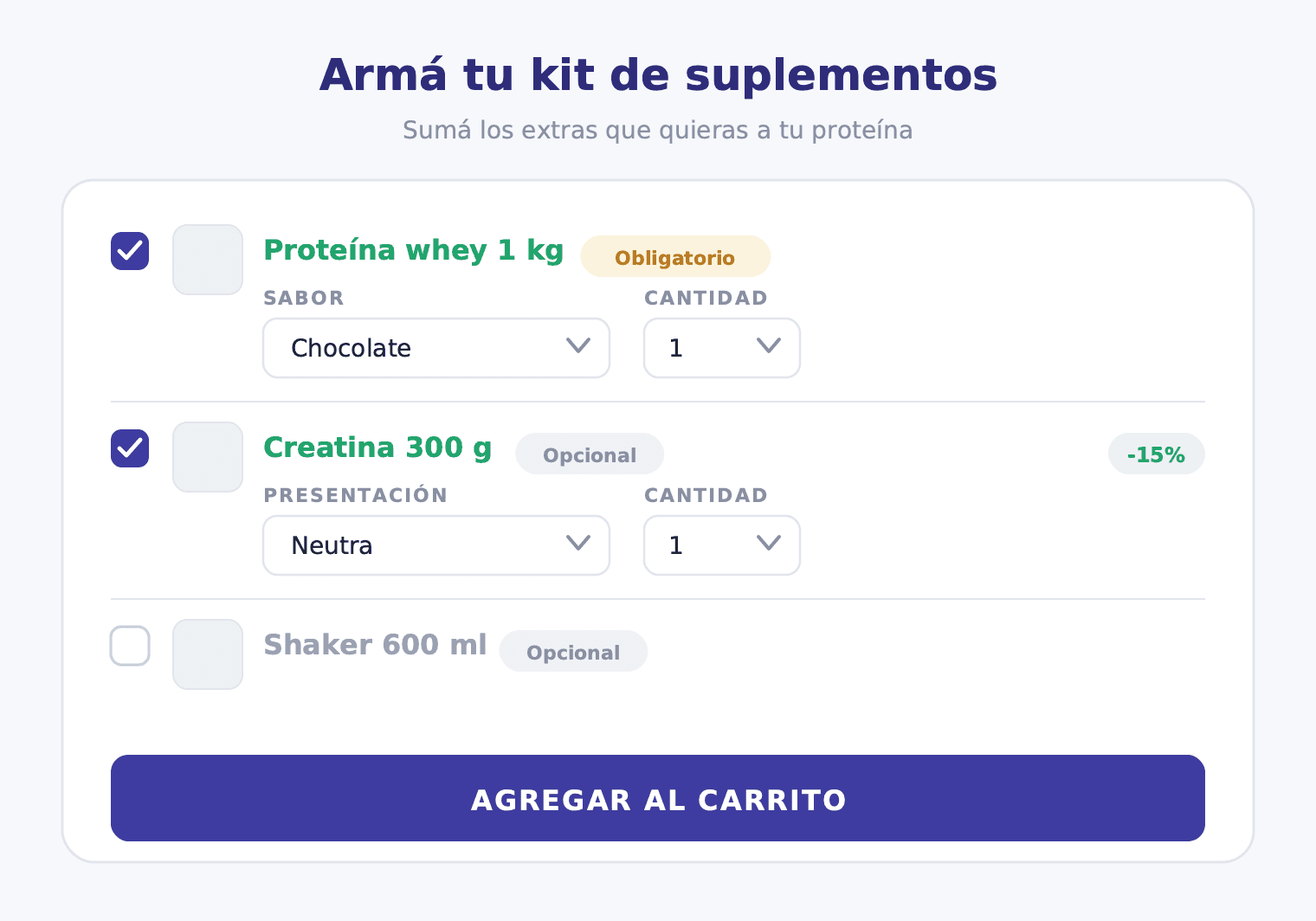
In a supplement store, some products are already decided before the customer even lands on your site. Whey protein is the clearest example: it's the foundation of every stack, the product that runs out first, the reason behind the visit. The challenge isn't selling it — it's already sold. The challenge is turning that purchase into a larger, more profitable cart that also delivers more value to the customer.
That's exactly what a Kit is built for.
Why Kit and not Combos for this use case
The difference between Kit and Combos isn't just technical — it's a different commercial logic.
Combos is for when you define a fixed structure and the customer fills in the details. For example: "You're buying a 3-supplement pack. In slot 1, choose your protein flavor. In slot 2, choose your creatine type. In slot 3, choose your BCAA." Every customer completes all 3 slots. The structure is non-negotiable.
A Kit works differently. It's for when you want to anchor the set on a product that always goes in, and then let the customer decide which extras to add. The message is: "The protein is definitely in. Now choose whether you want to add creatine, BCAAs, or a shaker — each at a per-item discount."
For a fitness store, that's a much more natural shopping experience. Customers don't want to be forced into fixed slots. They want to choose whether today they add creatine or prefer to pick up a shaker instead. The Kit gives them that freedom within a structure the store controls.
How the Kit works in the storefront
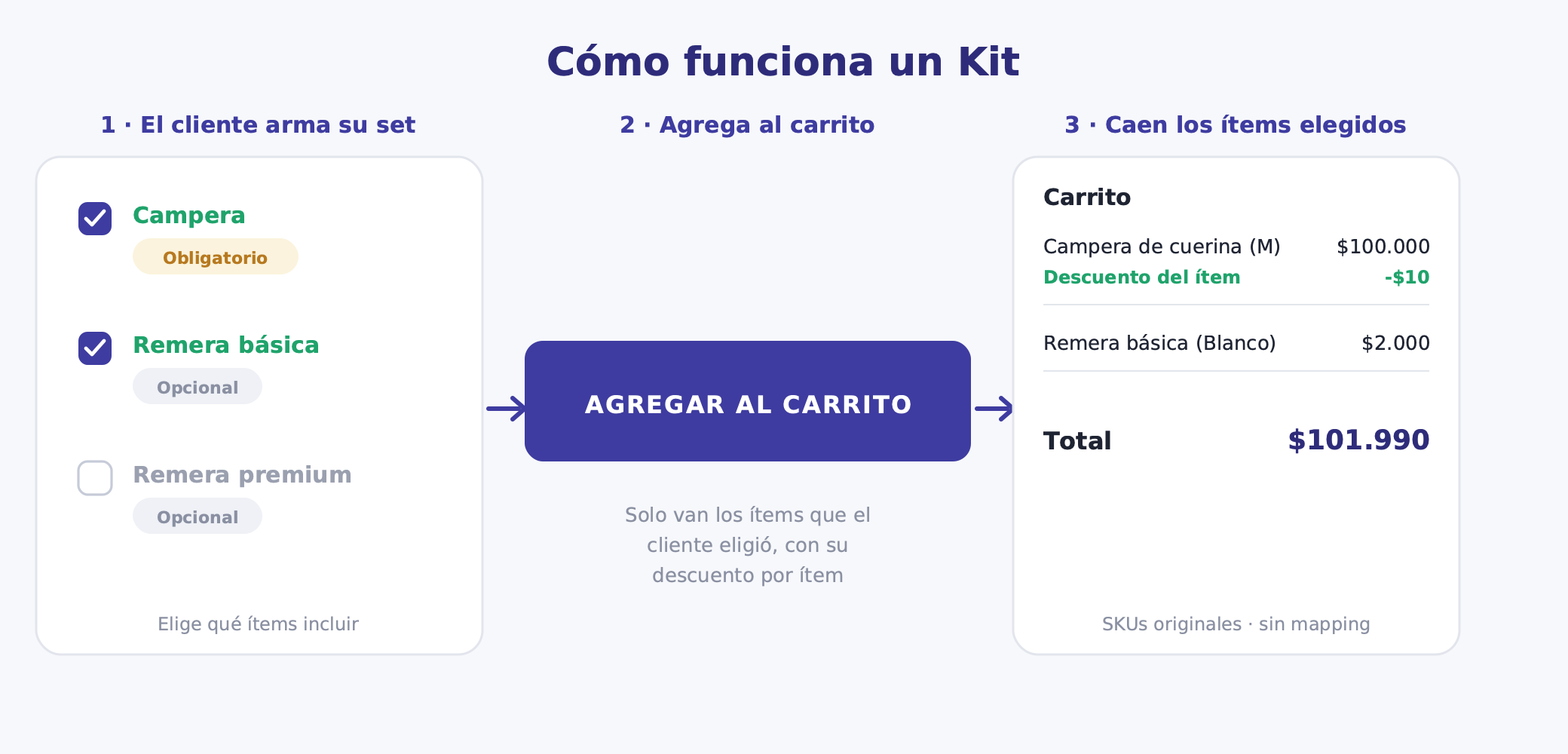
When a customer lands on the Kit page, they see a selector with all the set's elements. The protein appears with an active flavor selector but no option to remove it from the set — it's required. Optional elements show a toggle or checkbox to include or skip them. When the customer activates an optional element, they choose the variant if applicable and see the per-item discount applied in real time.
The add-to-cart button activates once the customer meets the Kit minimums — in this case, minimum 1 item, which is just the protein. They don't need to complete every optional element.
Here's an example of how the element configuration might look for a supplement store:
| Element | Type | Variant | Per-item discount |
|---|---|---|---|
| Whey protein 1 kg | Required | Flavor (vanilla, chocolate, strawberry) | 10% |
| Supplement (creatine, BCAA, or glutamine) | Optional | — | 15% |
| Accessory (shaker, gloves, or band) | Optional | — | 10% |
Selection limits: minimum 1 item (the protein), maximum 3 items (protein + 2 extras).
The customer can check out with just the protein at 10% off, or take advantage of the optional extras to build the complete set and save more per item.
Kit ideas for fitness stores
The Kit format is flexible. These are some configurations that work well in the fitness and supplement space:
Starter pack: Protein (required) + choose 1 or 2 extras: shaker, creatine, BCAAs. A solid entry Kit for new customers who want to start with the basics without overthinking it.
Advanced stack: Protein (required) + pre-workout (optional) + recovery supplement (optional). For customers who already train regularly and want to optimize their performance and recovery.
Competition kit: Protein (required) + glutamine (optional) + energy bars (optional). Aimed at athletes preparing for an event who need complete nutritional support.
Gym bag essentials: Protein (required) + shaker (optional) + resistance band set (optional). A Kit designed so the customer has everything they need in their gym bag.
Travel kit: Travel-size protein (required) + bars (optional) + snack packs (optional). For customers who travel frequently and don't want to lose their training rhythm.
Each of these Kits addresses a different purchase moment. They're not variations of the same product — they're concrete propositions for specific situations.
Per-item discount strategy
The Kit lets you assign a different discount to each element, and that's a powerful lever for a fitness store.
Protein typically has tighter margins and sells on its own regardless. A 10% discount there is enough to make the Kit landing attractive without giving away too much margin. Supplements and accessories usually have more room and need a stronger incentive for the customer to add them: 15% on creatine or BCAAs and 10% on accessories shifts the calculation for the buyer without destroying profitability.
The maximum selection limit (3 items in this example) protects margin. Beyond that ceiling, additional items can still be added at full price — though in this Kit structure, the maximum caps what's included. The point is that you control how many discounted extras can be claimed.
The general rule: higher discount on the extras you want to move, more conservative discount on the anchor that already sells itself. Use selection limits as a margin control valve.
Variant handling per element
One of the Kit's strengths is that each element manages its own variants independently.
The whey protein can have flavors (vanilla, chocolate, strawberry, cookies & cream). The customer selects the flavor they want for that element. Creatine, on the other hand, might be a single monohydrate product with no flavor variant — the customer simply includes it or not. The shaker might have a color variant.
Each Kit element is configured with the variants that make sense for that specific product. There's no global Kit variant. This avoids the combinatorial explosion problem that plagues variant products on TiendaNube and allows stock to be controlled product by product.
Stock risk
The weakest point of a fitness Kit is the protein. If it goes out of stock in a popular flavor, the Kit landing can break for that variant. You need to monitor inventory for the required element more closely than any other product in your catalog.
Optional elements carry less risk: if creatine runs out, the customer can still complete the Kit with BCAAs or without any supplement. The Kit remains valid. The real problem is when the anchor fails.
Before launching the Kit, make sure the required product has solid stock across all its variants. And if you need to pause the Kit for restocking, coordinate with your team first: while the Kit is paused, the landing product that Bundle automatically creates on TiendaNube returns a 404. Any link you've shared on social or in emails will break.
Operations and SKUs
When the customer checks out, what arrives at the warehouse are the original products with their real SKUs. The order looks like this: "1x Whey Protein Chocolate 1kg + 1x Creatine Monohydrate + 1x Blue Shaker." No virtual bundle products, no combos to decode.
That simplifies fulfillment under any logistics model. TiendaNube's Full service sees three individual SKUs and picks them separately. A third-party warehouse receives a standard picking order. Contabilium records three real product lines with no manual mapping or artificial items.
The per-item discount is applied as a discount line at checkout, not as a modification to each product's base price. That keeps sales reports clean and prevents distortion of historical unit prices.
How to set it up in Bundle
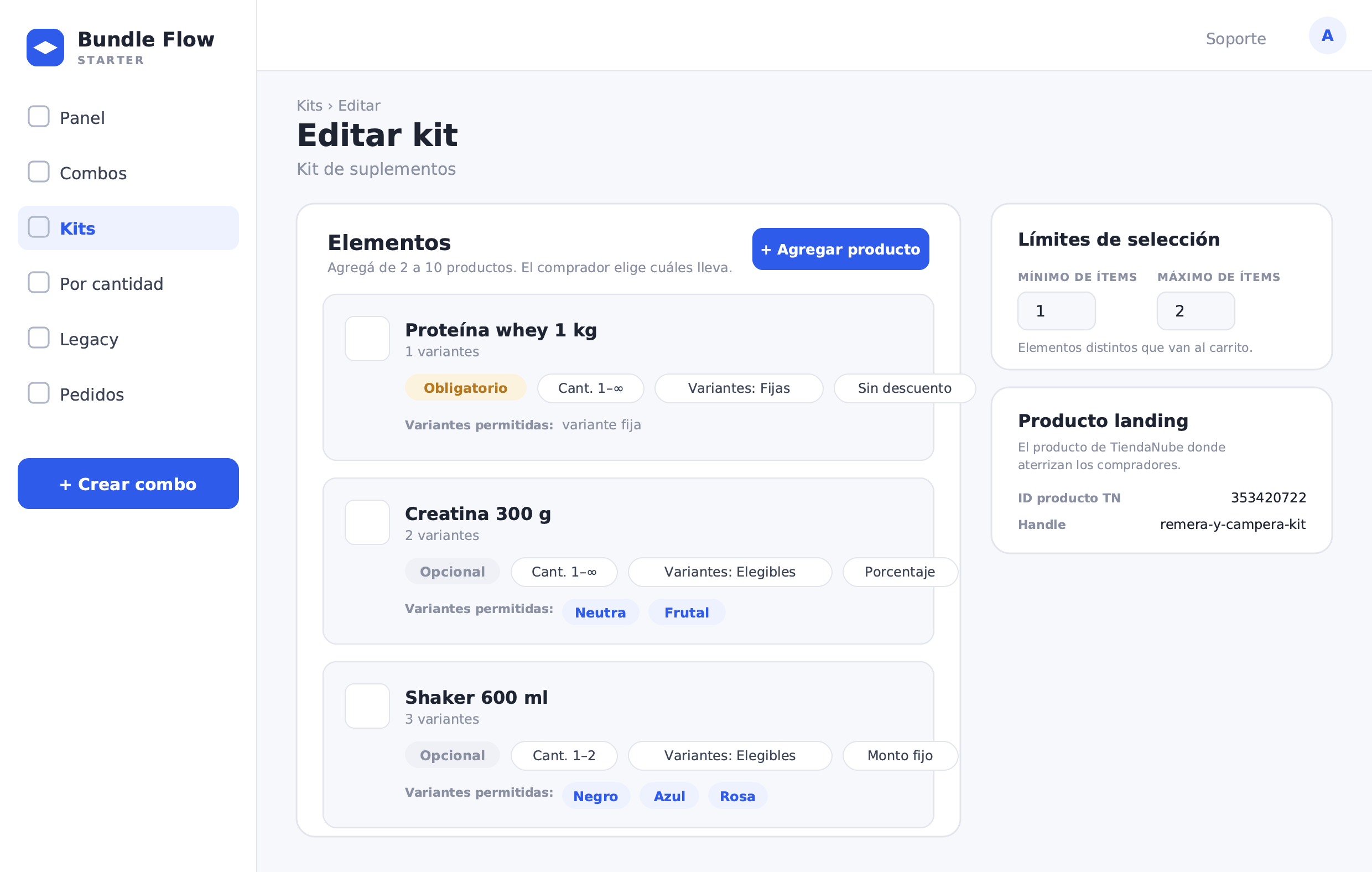
Creating a Kit in Bundle is straightforward:
- In the Bundle menu, go to Kits and select Create kit (or from the combos menu, choose the Kit option). This feature is in BETA.
- Fill in the name and description of the Kit. The description is the pitch the shopper sees on the landing page — use it to explain the proposition (for example, "Build your stack: take the protein and add the extras that work best for you at a discount").
- Add the elements of the Kit (between 2 and 10). For each element: choose the product, set it as Required or Optional, define minimum and maximum quantity, select allowed variants, and assign the per-item discount (none, percentage, or fixed amount).
- Whey protein 1 kg: Required, quantity 1, allowed flavors, 10% discount.
- Supplement: Optional, quantity 1, no variant, 15% discount.
- Accessory: Optional, quantity 1, no variant, 10% discount.
- Set the selection limits: minimum items that must go to cart (1, the protein) and maximum discounted items (3).
- Adjust settings: display priority, free shipping if applicable.
- Bundle automatically creates the landing product on TiendaNube. That product is the entry point for the Kit in your store.
- Publish the Kit. From the panel you can pause, resume, or archive it at any time.
The number of Kits available depends on your plan tier.
What to measure once the Kit is live
A fitness Kit generates data that goes well beyond average order value. These are the most useful indicators to optimize the proposition:
Optional element attach rate: What percentage of customers who buy the Kit add the supplement? What about the accessory? If creatine attach is 60% but shaker attach is 20%, the shaker probably isn't the right complement for that Kit.
Average extras per Kit: If the average is near the minimum (1), the Kit isn't convincing customers to add extras. If it's close to the maximum (3), the discounts are working — and it may be worth reviewing whether that ceiling is set correctly.
Kit revenue vs. protein sold alone: Compare the Kit's average order value against a customer who bought just the protein. The difference is the value the Kit is generating.
Most popular combinations: Which protein + supplement + accessory combination repeats most often? That combination tells you which products you should always keep in stock, or which Kit could be turned into a fixed bundle in the future.
The underlying logic of a fitness Kit is simple: the protein was already sold. The Kit converts that guaranteed purchase into an opportunity to deliver real value to the customer and more margin for the store — without forcing or overcomplicating the buying process.