How fashion stores use product Kits
Take the main garment and add optional pieces: the shopper builds their set and picks what to include.
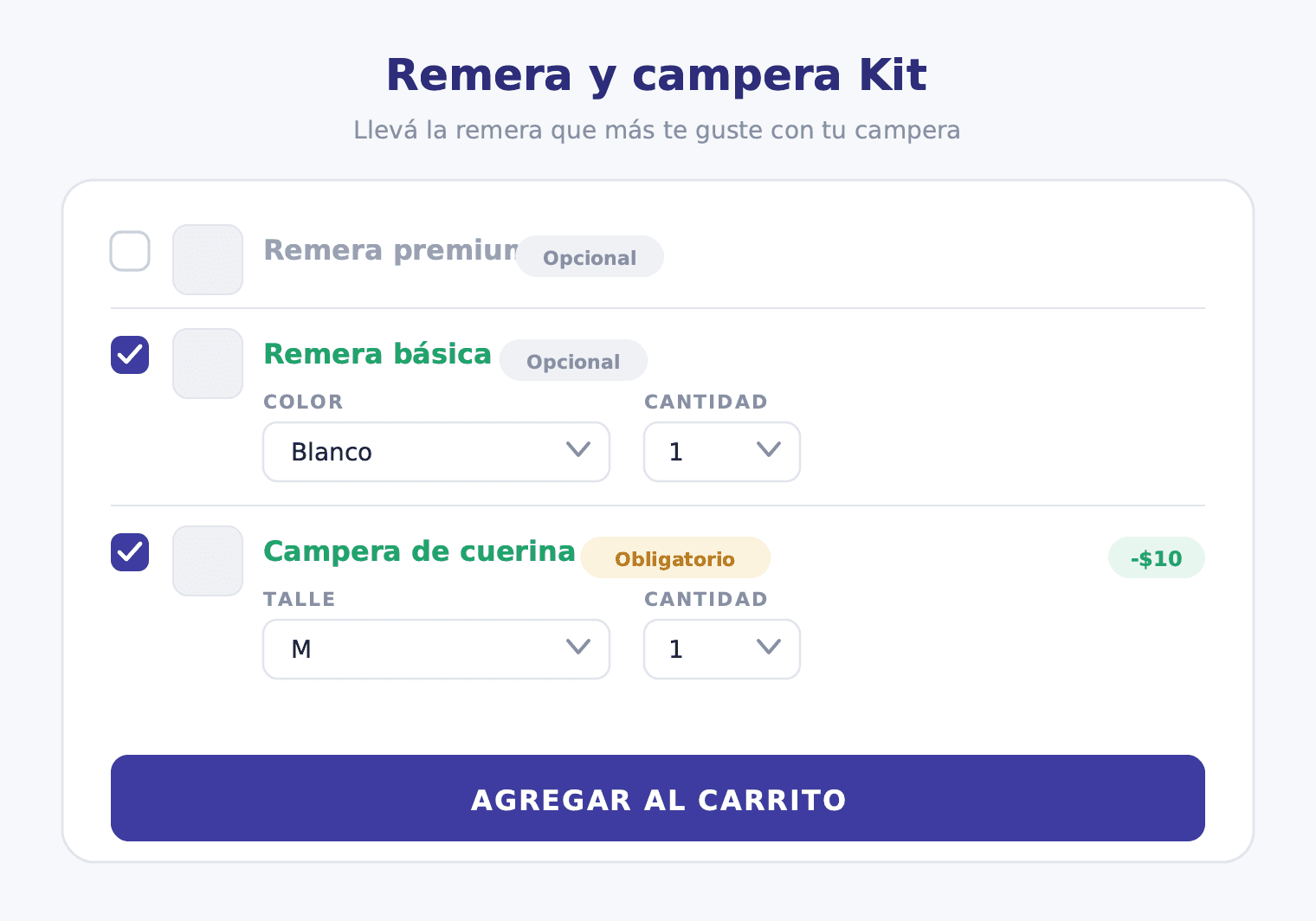
In fashion retail, there's always one piece that leads the season. The jacket that sells itself. The garment the customer already has in mind when they land on your store. And around that piece, there's a whole universe of t-shirts, accessories, and complementary items the customer could take — but without a nudge, they leave for another visit that often never happens.
The Kit is the nudge.
Why Kit and not Combos for fashion
Before diving into the setup, it's worth understanding the difference between Kit and Combos, because confusion between the two is common in apparel stores.
Combos is for when the store defines a complete outfit structure and the customer selects the variant for each position. For example: "The look has a t-shirt, jeans, and sneakers. In the t-shirt slot, choose the color. In the jeans slot, choose the size. In the sneakers slot, choose the size." Every customer takes all three pieces. The structure doesn't change.
A Kit has a different logic. It's for when the store wants to anchor the set on a main piece that always goes in, and let the customer decide which complements to add. The message is: "The jacket is definitely in. Now choose which t-shirts you want to add to the set."
For a clothing store that wants to move basics inventory alongside a season-defining anchor piece, the Kit is the right tool. It doesn't force the customer to take a predefined complete outfit — it offers freedom within a curated set.
How the Kit works in the storefront
When the customer lands on the Kit page, they see the jacket taking center stage — it's the visual and commercial anchor of the set. Below or alongside it, the optional elements appear — the t-shirts — with their description, image, and an active variant selector (color, size).
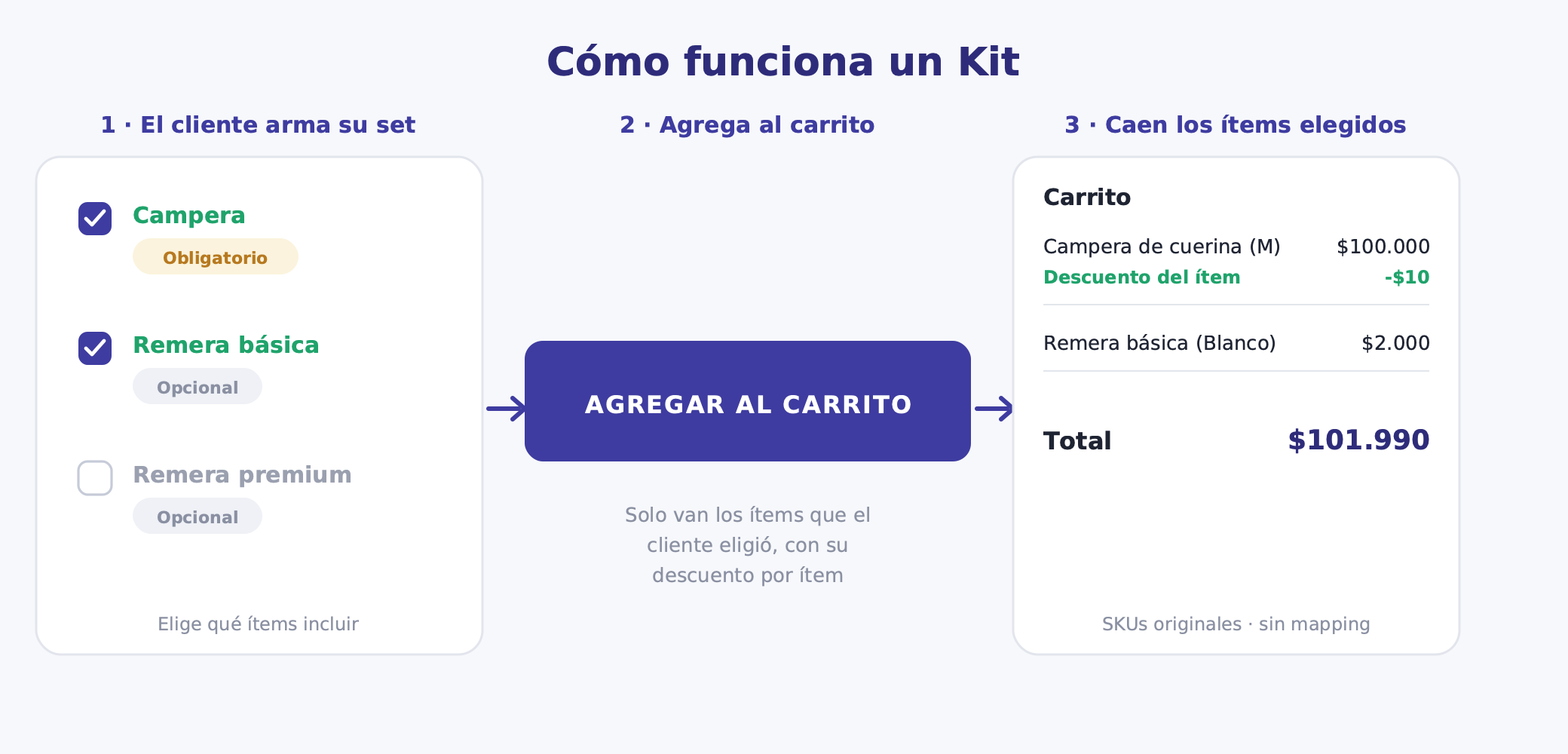
The customer can choose to include none, one, or both optional t-shirts. When they activate a t-shirt, they select the color or size they want for that specific piece. The cart is built with the selected garments, each with its per-item discount applied.
Here's the example based on the real demo case:
| Element | Type | Variant | Discount |
|---|---|---|---|
| Leather jacket | Required | Size (S, M, L, XL) | −$10 |
| Basic t-shirt | Optional | Color (black, white, navy) | No discount |
| Branded t-shirt | Optional | — | No discount |
Selection limits: minimum 1 item (the jacket), maximum 3 items.
In this case, the discount is on the jacket: the customer gets $10 off by taking it as part of the Kit. The optional t-shirts are priced regularly, but the hook is the cheaper jacket and the convenience of building the complete look in a single step.
Kit ideas for fashion stores
The format applies to many scenarios beyond the jacket example:
Dress + optional accessories: The dress is required (the season anchor), the bag and belt are optional. The customer decides whether to build the complete look or just take the dress.
Swimwear + beach extras: The swimsuit or swim trunks are required; the sarong, beach bag, and sunscreen are optional. A perfect Kit for the summer season.
Work blazer + optional shirts: The blazer is required, the customer picks two or three shirts to pair with it. You move basics inventory that would otherwise sell one piece at a time.
Curated collection: The customer picks 3 pieces from a selection of 6 seasonal basics. In this case there's no required piece — all elements are optional but the minimum is 3. An ideal Kit for brands that want to propose a pre-built wardrobe.
Gift builder: A main garment (required) + the customer picks which accessories to include as a gift. Ideal for special occasions when someone is buying for another person and isn't sure what they'll like best.
Discount strategy for fashion
In the jacket example, the discount is on the anchor and the optionals are at regular price. That's a valid strategy when the jacket has enough margin to absorb the discount and the main hook is the convenience of building the look in one place.
But there are other equally valid approaches:
Discount on the optionals: The jacket is full price, and the t-shirts the customer adds get 15% or 20% off. The logic: the customer wanted the jacket anyway, and the discount on the t-shirts is the incentive to grow the cart.
Tiered discount: The first optional t-shirt gets 10% off, the second gets 20%. You incentivize the customer to take both complements, not just one.
No discount, curated proposition: Sometimes a Kit doesn't need a discount. The value is the complete look proposition, the convenience of not having to figure out what goes together. In that case, the Kit functions as a visual merchandising tool, not a pricing tool.
The decision depends on the margin of each piece, the goal (moving optional inventory vs. increasing ticket vs. strengthening brand image), and the season.
Variant handling per garment
Each Kit element manages its own variants independently. That's what makes the Kit viable in fashion, where every piece has a size, a color, or often both.
The leather jacket in the example can have size (S, M, L, XL) as a choosable variant. The customer selects their size in the "Jacket" element. The basic t-shirt can have color (black, white, navy) as a choosable variant. The customer selects their color in the "Basic t-shirt" element. If the branded t-shirt comes in only one version, it has no choosable variant.
Each element is configured independently. There's no global Kit variant that combines jacket size with t-shirt color. That avoids the combinatorial explosion problem and allows stock to be managed product by product, variant by variant.
Stock risk in fashion
The critical point is the anchor. If the jacket runs out of stock in size M — the most requested — the Kit landing may stop working for that size. Monitor inventory on the required piece closely before and during the campaign.
For optional elements, the risk is lower. If the branded t-shirt sells out, the customer can still complete the Kit with the basic t-shirt or without adding any t-shirt. The Kit remains valid.
Before launching the Kit, confirm the jacket has stock in all sizes. If you know size L will sell out within a week, consider whether it's worth launching the Kit or waiting for restocking. And remember: when the Kit is paused, the landing product on TiendaNube returns a 404. If you sent that link in a campaign email, the link is broken. Coordinate with your team before pausing.
Operations and SKUs
When the order arrives at the warehouse, it shows the original SKUs for each piece. The example looks like this: "1x Black Leather Jacket Size M + 1x White Basic T-shirt Size M + 1x Branded T-shirt Size M." No bundle product, no virtual item to decode.
For TiendaNube's Full service, that means each piece is picked separately, just like any regular order. For a third-party warehouse or a dropshipping partner, the picking process is the same as always. Contabilium records three real product lines with their historical unit prices intact.
The Kit discount — in this example, the $10 off the jacket — appears as a separate discount line at checkout. It doesn't modify the jacket's base price in the catalog. Sales reports don't distort the historical selling price of the piece.
How to set it up in Bundle
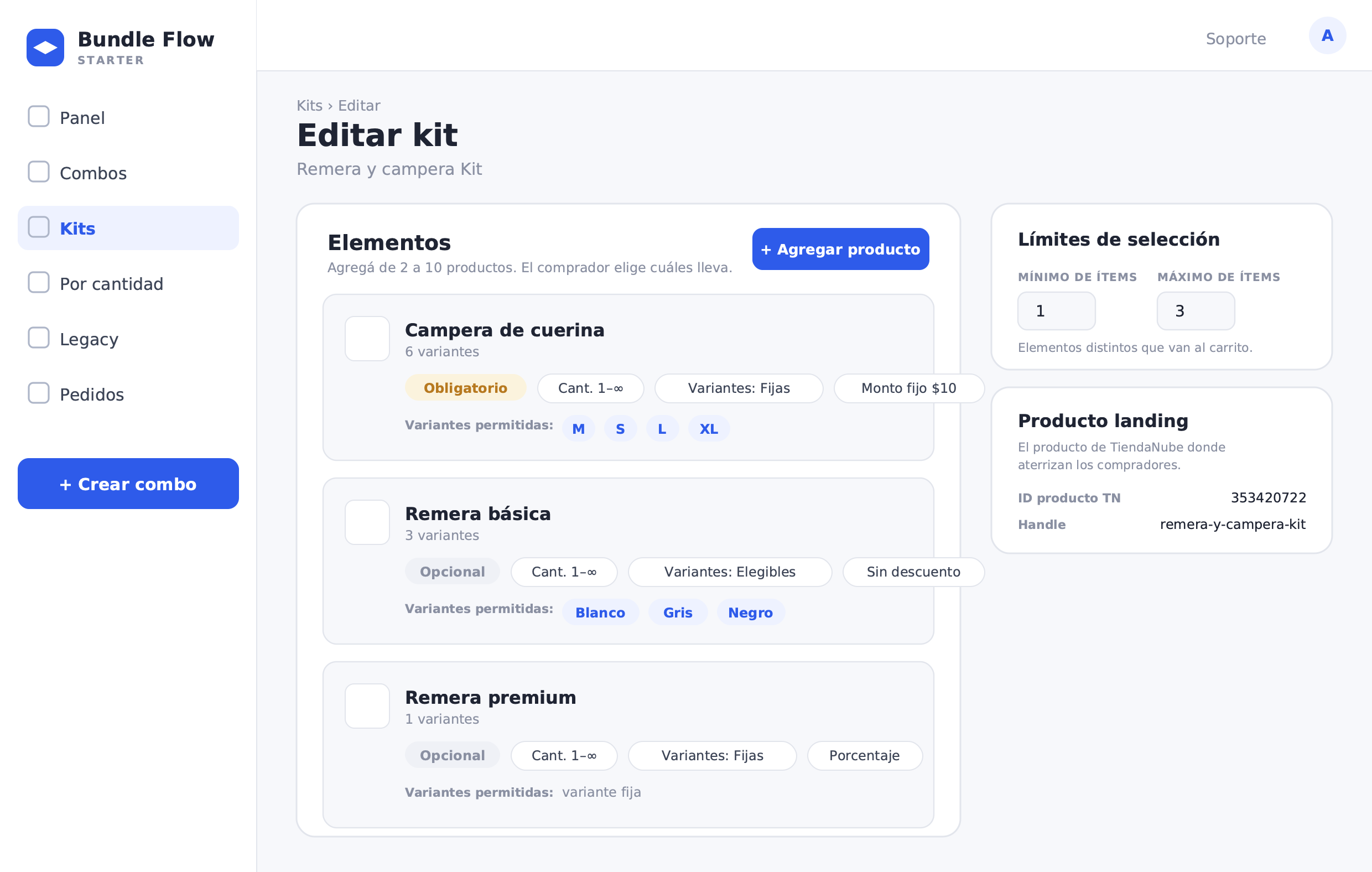
Here are the steps to build a fashion Kit in Bundle:
- In the Bundle menu, go to Kits and select Create kit (or from the combos menu, choose the Kit option). This feature is in BETA.
- Fill in the name and description of the Kit. The description is the text the shopper sees on the landing page — use it to tell the look's story (for example, "Take the jacket and build your look with the t-shirts you like most").
- Add the elements of the Kit (between 2 and 10). For each element: choose the product, set it as Required or Optional, define minimum and maximum quantity, select allowed variants, and assign the per-item discount.
- Leather jacket: Required, quantity 1, allowed sizes, −$10 discount.
- Basic t-shirt: Optional, quantity 1, allowed colors, no discount.
- Branded t-shirt: Optional, quantity 1, no variant, no discount.
- Set the selection limits: minimum 1 item (the jacket) and maximum 3 items.
- Adjust settings: display priority, free shipping if it applies to this Kit.
- Bundle automatically creates the landing product on TiendaNube, which serves as the entry point for the Kit in your store.
- Publish the Kit and track it from the panel. You can pause, resume, or archive it whenever needed.
The number of Kits available depends on your plan tier.
What to measure once the Kit is live
The fashion Kit generates valuable data about how customers combine pieces — data that's otherwise difficult to obtain.
Most added t-shirt colors: If black accounts for 70% of adds and navy barely registers, that tells you which t-shirt variant to restock first and which one might not be worth including in the next Kit.
Most frequent jacket + t-shirt combinations: Which pair or trio repeats most often in Kit orders? That combination is the foundation of your next lookbook, your next social media shot, or your next campaign email.
Kit conversion vs. jacket sold alone: What percentage of customers who land on the Kit page end up buying the Kit vs. just the jacket? If the Kit rate is low, the optional pricing or the value proposition needs a revision.
Average items per Kit: If the average is 1.2 (almost no one adds t-shirts), the Kit isn't convincing. If the average is 2.5 out of a maximum of 3, you're in the optimal zone — and maybe you can raise the limit to see what happens.
The logic behind a fashion Kit is the same as in any category: the anchor was already sold. The Kit converts that guaranteed purchase into an opportunity to build a complete look, move basics inventory, and grow the average order value without forcing the customer to take anything they didn't choose.