How fashion stores use Combos
Build your outfit: sell complete looks without fighting your store's variant limits.
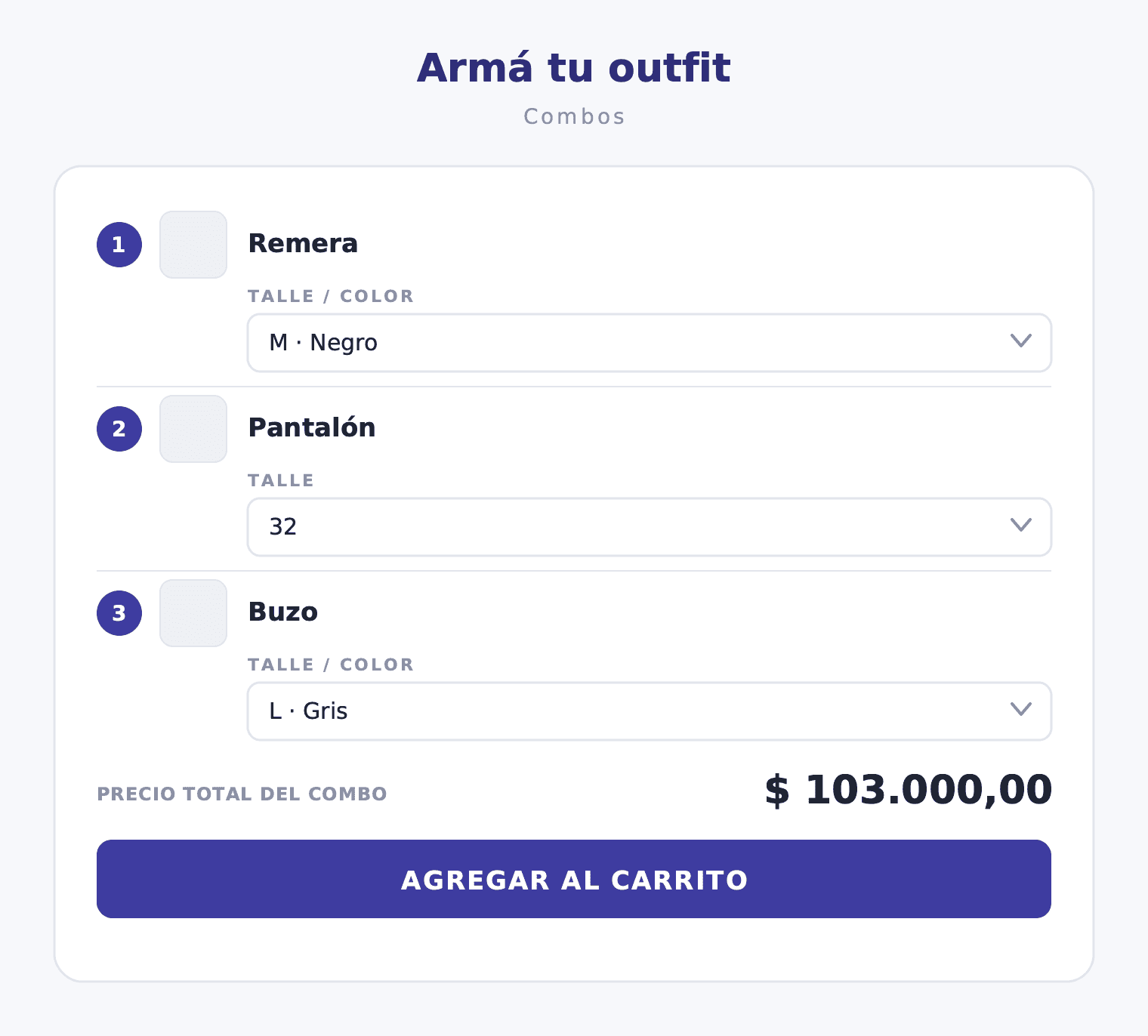
Why outfits and looks sell more than single items
When a shopper visits a clothing store and leaves with a complete look, the basket is larger and the return rate is lower. They have already seen the pieces together, chosen the combination that works for them, and committed to the full outfit. They also discover complementary pieces they would not have added if they had arrived looking for just a t-shirt.
Fashion is an inherently bundling category. A look already implies multiple garments that relate to each other: a top, pants, outerwear. The challenge is giving shoppers the flexibility they need — size AND color per garment — without creating technical complexity the store cannot sustain at scale.
That balance between personalization and operational simplicity is exactly what Combos solves. The customer builds the look with their own choices; the store does not create any new product and does not push against the platform's variant limits.
The variant limit problem in fashion
TiendaNube has a limit on the number of variant axes and combinations per product. A garment with four sizes and six colors already has 24 combinations. If you tried to create a single "complete outfit" product with three garments — a t-shirt, trousers, and a sweatshirt — each with their own sizes and colors, the combinations multiply into hundreds or thousands. No platform handles that cleanly.
Combos solves this at the root because the bundle does not create a new product. Each garment stays as its own individual product with its own variants. The bundle is the logic that links them together in the selector: the customer picks the size and color of each garment separately, inside the same widget, and when they add to cart the individual products land with their original SKUs. No variant limit, no SKU mapping, no artificial products.
What are Combos
Combos defines the slots of the pack — one per garment — and lets the customer fill in the variant for each: size, color, or both. All items land in the cart as individual SKUs plus an automatic discount line if the pack includes one. It is not a fixed kit. It is not an invented product. It is the look the customer built, with their choices, ready to ship exactly as the store's systems expect.
How it works
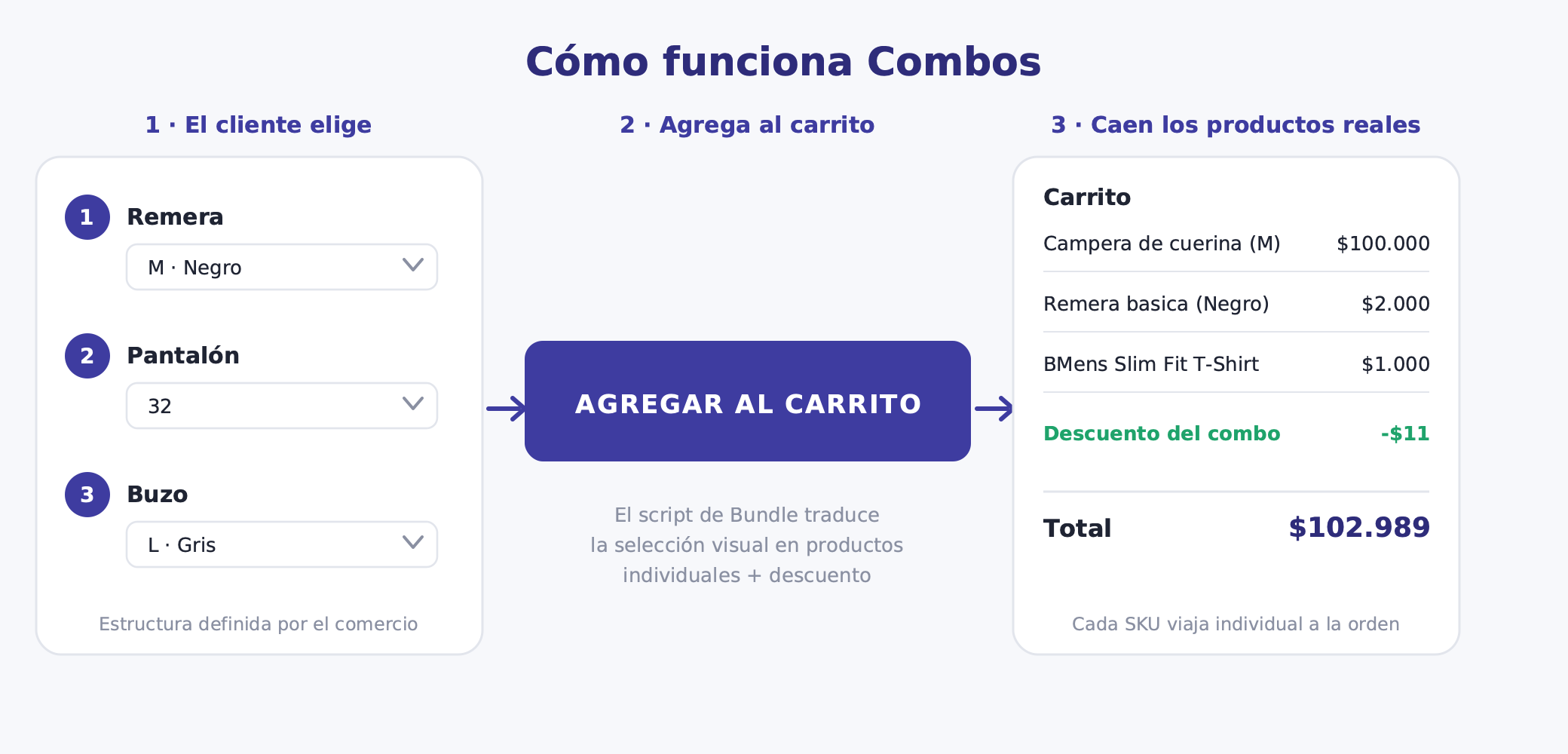
The widget injects a selector on the product page with one slot per garment. In each slot the customer picks the relevant variant — size, color, or both. The total outfit price updates in real time. The add-to-cart button activates when all required slots are filled.
When they add: each garment lands in the cart as an individual item with its original SKU and variant. Plus a discount line if the pack includes one. No artificial SKU, no picking ambiguity, no friction at third-party warehouses or accounting tools.
| Slot | Garment | Variant |
|---|---|---|
| 1 | T-shirt | Size and color |
| 2 | Trousers | Size |
| 3 | Sweatshirt | Size and color |
A slot can have locked variants — a garment fixed to a specific color or size, useful for gift items or pieces with a closed palette — or choosable variants, where the customer selects from the options you enabled. That flexibility allows you to build anything from fully customizable outfits to tighter curated sets.
Bundle ideas for fashion stores
Build your outfit. T-shirt plus trousers plus sweatshirt, each with choosable size and color. The most versatile format and the one that performs best on seasonal product pages. The shopper assembles the full look according to their color preferences and the combination that works best for them.
Full look. Top plus bottom plus outerwear plus accessory. Works well for seasons with a defined style direction. When the brand has a collection with a specific palette, this format surfaces the complete look and makes it purchasable in a single interaction.
Basics set. Two or three t-shirts in different colors, same size. The customer picks which ones to take. This works very well for basics or underwear brands where the customer already knows the product and just wants to restock in different colors without overthinking.
Seasonal capsule. Three or four curated pieces that combine well with each other. Ideal for limited editions or capsule collections where the brand wants the customer to take the full set. The look is already curated; the customer just picks the size.
Gift set. You fix the garments and let the recipient choose the size. Reduces friction for gift buyers who do not know the exact size. The color can be fixed if the gift has a defined palette or choosable if you want to give the buyer more freedom.
Which variants matter in clothing
Size is always choosable, unless the bundle is a fixed-size set — baby kits, uniforms, one-size items. It is the most critical variant in clothing because getting it wrong generates returns. Do not lock it unless you have a very specific reason.
Color is choosable when the garment comes in multiple colors and the customer has a preference. It can be locked if the outfit has a closed palette and all colors are already defined by the look. The key is not to show options that do not make sense for the customer to choose.
Fit or cut — slim, regular, oversized — matters more for trousers and t-shirts. If the same garment has different fits with different SKUs, it is worth exposing that as a variant in the corresponding slot. If the fit is unique for that garment, do not show it.
The general rule: only show the variants the customer actually needs to choose. If a garment's color is already defined by the look, there is no reason to open it up. Every extra decision you ask the customer to make is an opportunity for them to abandon the selector before completing it.
Pick a discount that protects your hero pieces
The outfit discount should encourage buying the full set without sacrificing margin on garments that already convert well on their own. If a jacket sells perfectly at full price, there is no reason to include it in a pack with aggressive discounting.
A percentage off the total outfit is clear to the customer and easy to communicate in campaigns: "complete the look and get 15% off." A per-item discount on complementary pieces — the t-shirt at full price, trousers at 15% off when added to the set — lets you protect margin on hero pieces while moving the ones that turn over more slowly.
The lowest-price item discounted or free encourages adding the third garment without touching the two main pieces. And there is always the option of no discount: for curated seasonal outfits where the style proposition is the value, the convenience of buying everything together can be sufficient without needing to lower the price.
Avoid heavy discounts on garments with strong individual demand. The bundle is for selling the set and for moving complementary pieces that turn over less on their own. It should not undercut the standalone garment.
Stock risk in clothing
Popular sizes — M in t-shirts, 38 in trousers — sell out before others. If a size runs out in one of the outfit's garments, a shopper who wants that size cannot complete the combo. That is a lost sale and a frustrating experience.
Before launching a pack, verify that all outfit garments have stock across the main sizes. Remove from the slot's allowed options any sizes with very low or zero inventory so the customer does not reach the end of the selector and find their size unavailable. Plan replenishment on the same timeline as the campaign window.
A quick pre-launch check: open each slot and confirm at least two or three valid size options are available. If size M is at zero for any of the garments, the pack will generate a high abandonment rate.
Operations: why the real SKU is the key differentiator
This is THE differentiator that makes Combos viable at scale for fashion brands using third-party logistics or the Full fulfillment service. When the customer builds the outfit and adds it to cart, Bundle puts each garment as an individual item with its original SKU and variant.
The fulfillment operator or your own shipping team sees the order and picks exactly what they always pick: "t-shirt size M black, trousers size L, sweatshirt size M white." There is no "bundle product" to translate. They do not need to know which outfit the customer bought. They just see the products they already know with the SKUs already in their system.
TiendaNube's Full service, if you use it, receives orders with the same individual SKUs it has in stock. No composite variants, no SKU mappings, no special instructions for fulfillment.
Accounting tools — Contabilium and similar — see three real order lines with real products: each garment with its SKU and its individual price. No virtual item, no kit SKU to manually reconcile against the real SKUs. The books balance on their own because the data is identical to what they would show if the customer had bought each garment separately.
This point is especially critical at high volume or when using third-party fulfillment. A bundle that creates an artificial SKU generates inventory problems, accounting reconciliation problems, and communication problems with the logistics operator from day one. One that uses real SKUs changes absolutely nothing in your existing operation.
How to set it up in Bundle
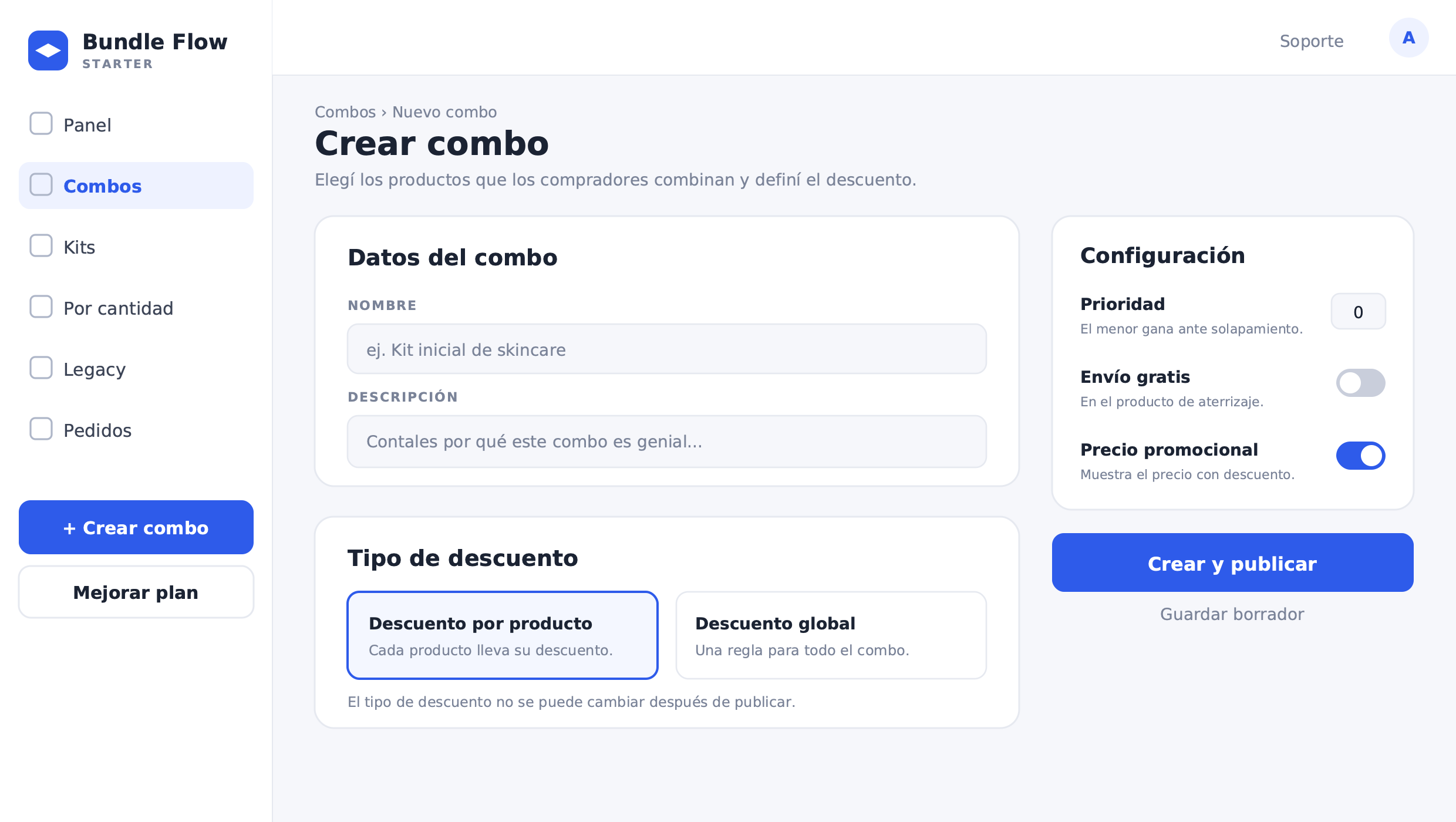
In the Bundle panel, go to Combos and select "Create bundle" (BETA module). The configuration flow is as follows:
- Enter the outfit name — for example, "Build your winter look" — and the description the shopper will see in the widget.
- Choose the discount type: per-product (each garment has its own discount) or global (one rule for the whole outfit). This field cannot be changed after publishing.
- Add components with "Add product" and include the outfit's garments. For each one, configure:
- Quantity: 1 per garment in most cases
- Variants: if the garment is fixed to a specific size or color, set variants to Locked (fixed slot). If the customer chooses, define the Allowed variants — for example, sizes S, M, L, XL enabled; colors black and white enabled
- Per-item discount if you chose per-product type
- In Settings, adjust the combo priority — useful when multiple outfits share garments — free shipping, and promotional price.
- Under Landing product, select the product where the selector will appear — usually the most expensive or best-selling garment in the outfit — and review the slot preview.
- Publish with "Create and publish" or save as a draft. You can pause or resume the pack at any time. While paused, the selector is hidden in the storefront and discounts do not apply.
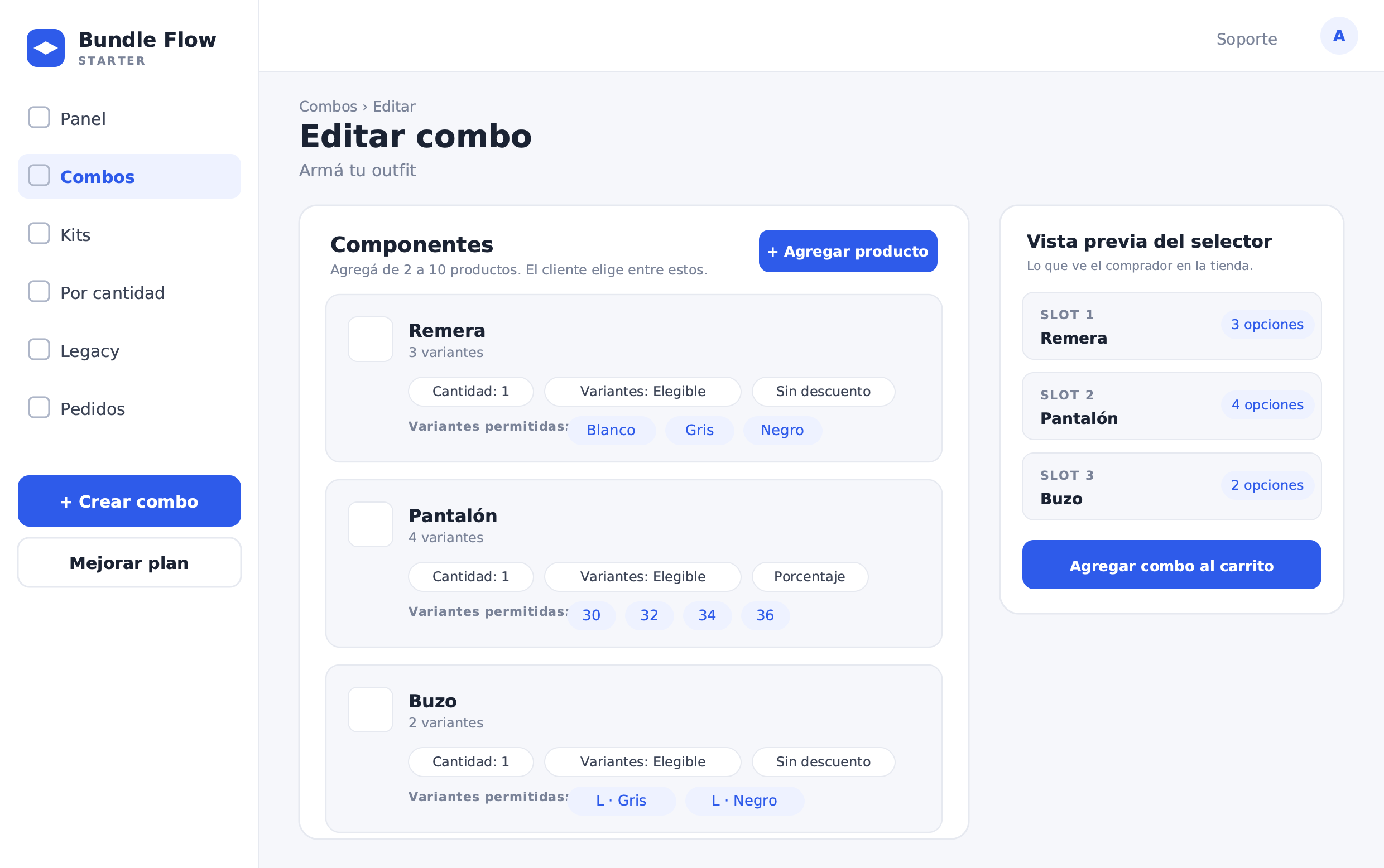
Each component you configure in the admin panel corresponds to one slot in the storefront widget. Locked variants produce a fixed slot: the shopper sees the garment but makes no selection. Allowed variants produce a choosable slot: the shopper sees chips with the sizes and colors you enabled and picks one of each. You can mix fixed and choosable slots freely within the same outfit.
What to measure
With the combo active, track these metrics to evaluate performance and decide where to adjust:
- Outfit completion rate: how many shoppers who see the selector actually add the full look to cart. This is the central UX metric for the pack.
- Average look value versus single-item AOV: if orders containing the bundle show a significantly higher AOV than single-garment orders, the pack is doing its job.
- Most popular combinations: which t-shirt color pairs most with which trouser size. That informs future outfits and stock replenishment decisions.
- Stock pressure per size and color: which run out first and in which garment. The most frequently chosen options in choosable slots will move faster than average.
- Bundle return rate: whether chosen sizes match what the customer actually wears. A high return rate may signal that size communication within the pack is not clear enough.
Closing thoughts
Combos lets fashion brands sell looks rather than items, without the SKU complexity of Legacy bundles. The customer picks what fits them; the warehouse picks what it always picked. That combination of improved purchase experience and frictionless operations is what makes this approach scalable for clothing stores selling complete outfits.