How skincare and cosmetics stores use product Kits
A made-to-measure skincare set: the shopper picks which products to include, with per-item discounts.
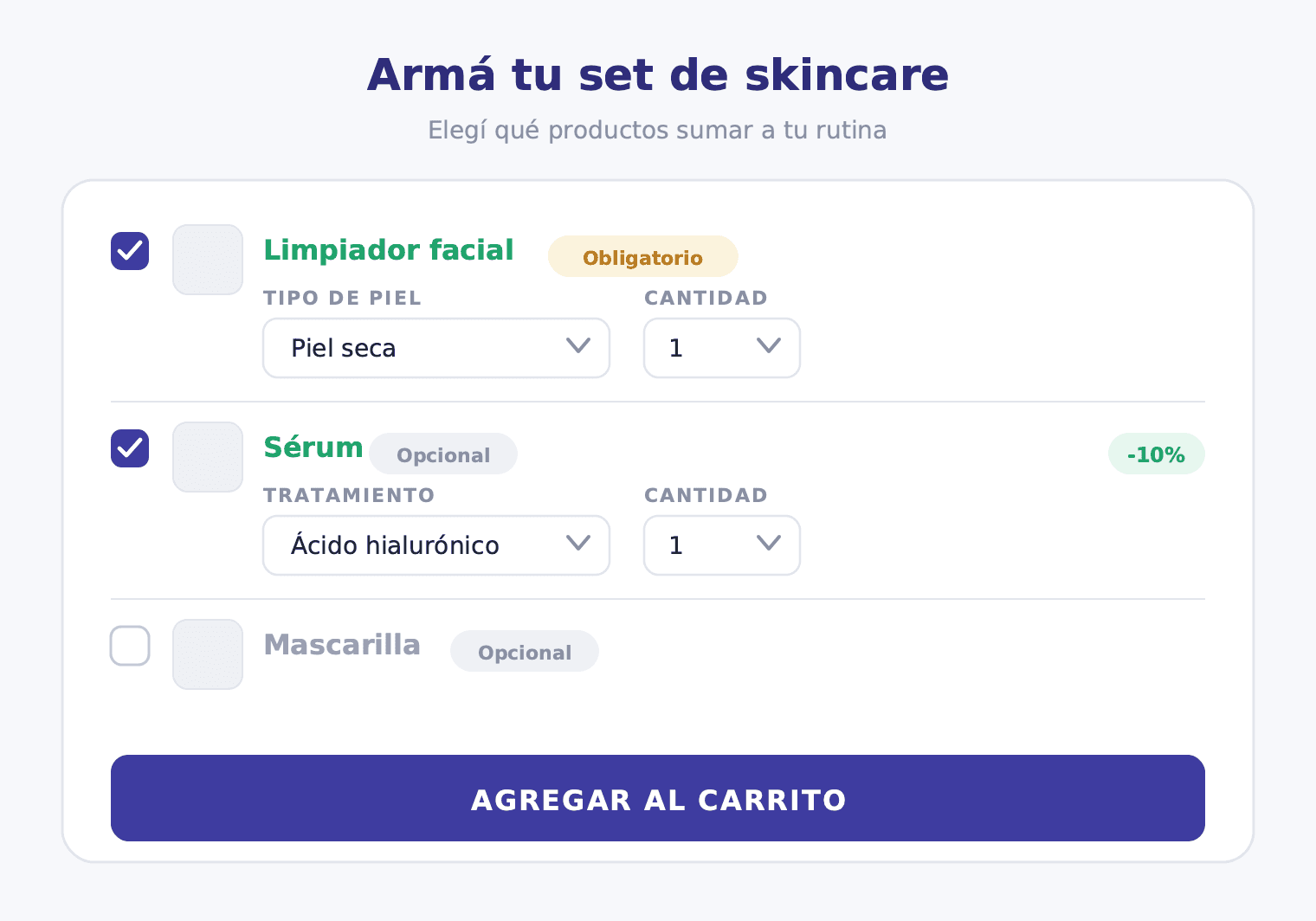
Skincare has a quality that few other categories share: the customer already knows what they need. They know their skin type, their routine, their staple products. What they don't always know is which extra to add to take that routine to the next level. The moisturizer is already decided. The question is whether the serum, the face mask, or the eye contour will make it into the cart too.
A well-built Kit turns that hesitation into an easy decision.
Kit vs. Combos for skincare
Skincare is one of the few categories where both Kit and Combos make sense — but for different use cases. It's worth understanding the difference before deciding which type of offer to build.
Combos is for when you want the customer to complete a full routine by choosing the product for each step. For example: "Build your four-step routine: choose your cleanser, your serum, your moisturizer, and your SPF." The customer fills all four slots; everyone takes something in each position. The structure is fixed, the steps are required. If you want to go deeper on that format, there's a dedicated post on how cosmetics stores use Combos.
Kit is for when you have an anchor product that always goes in, and you want the customer to decide which extras to add around it. For example: "The moisturizer is definitely in. Now choose whether you want to add the serum, the face mask, the eye contour, or all three." The customer can check out with just the anchor, or build a more complete set with the extras they choose.
These are two distinct commercial logics: Combos defines which steps the customer will follow; the Kit lets the customer define which extras they want around a product they've already decided to buy.
How the skincare Kit works in the storefront
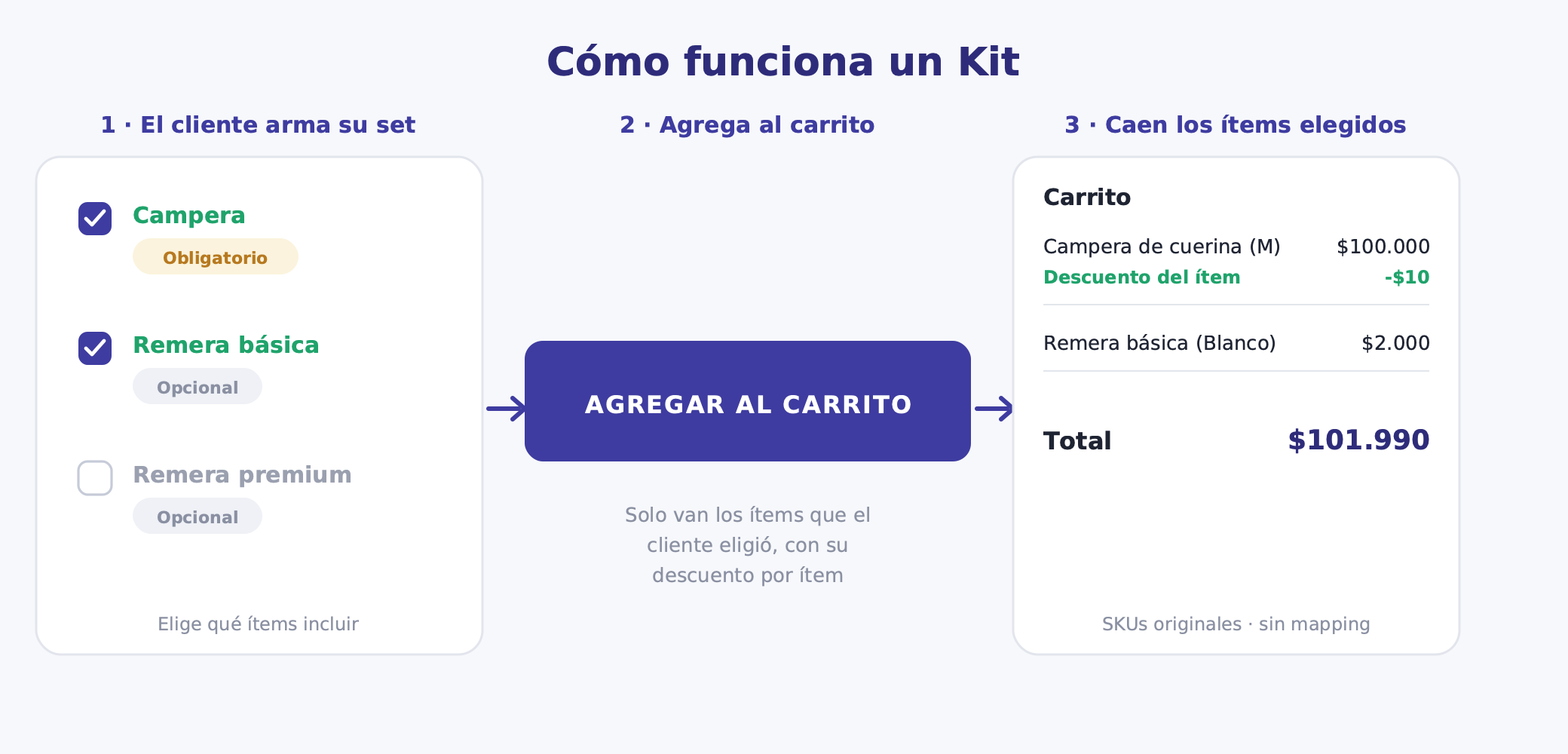
When the customer lands on the Kit page, they see the moisturizer occupying the primary position. It's there, it's required, it comes included. Around it, the optional products appear — serum, face mask, eye contour — each with its image, a short description, and the per-item discount that applies if they add it.
The customer activates the extras they want to include. If the serum has a skin-type variant, they choose it within that element. If the face mask is a single product with no variant, they simply toggle it on. The cart builds with the selected products, each carrying its individual discount.
The add-to-cart button activates when the customer meets the Kit minimum: in this case, 1 item (the moisturizer). No extras are required to complete the purchase.
Here's an example configuration for a skincare store:
| Element | Type | Variant | Discount |
|---|---|---|---|
| Moisturizer | Required | Skin type (dry, combination, oily) | 10% |
| Serum | Optional | — | 15% |
| Face mask | Optional | — | 15% |
| Eye contour | Optional | — | 10% |
Selection limits: minimum 1 item (the moisturizer), maximum 4 items.
The customer who takes only the moisturizer gets 10% off. The one who builds the complete set gets 10% on the moisturizer, 15% on the serum and mask, and 10% on the eye contour — per-item savings that grow as the set fills up.
Kit ideas for skincare and cosmetics stores
The Kit format is versatile. These are some scenarios that work especially well in skincare:
Moisturizer + treatment extras: The moisturizer is the required anchor; the serum, face mask, and eye contour are optional. The customer builds their extra treatment based on their current skin concern.
SPF + base makeup: The sunscreen is required; the primer and tinted moisturizer are optional. A Kit designed for the morning routine of customers who blend skincare and makeup.
Facial oil + complements: The oil is the anchor; the facial mist and exfoliator are optional. For customers who already have an established routine and want to go deeper.
Personalized gift kit: A box or base set is the required anchor; the customer picks 3 of 6 minis to complete the gift. Ideal for special occasions where the gift needs some curation but also some personalization.
Routine starter: Cleanser (required) + the customer picks 2 treatments from a list of serums and actives. For skincare newcomers who are starting a routine and aren't sure which actives they need.
Each of these Kits has a clear anchor and optional extras the customer can personalize based on their needs. That's what sets the Kit apart from selling products separately: there's a curated proposition, but with room for choice.
Per-item discount strategy
The Kit lets you assign a different discount to each product, and that's particularly useful in cosmetics, where margin varies significantly across categories.
The anchor moisturizer has tighter margins: a 10% discount is enough to make the landing attractive without giving away profitability. Serums and face masks typically have more margin and need an incentive for the customer to add them: 15% per item is the nudge that changes the calculation. The eye contour, with a higher ticket and reasonable margin, gets 10%.
The underlying logic: the highest discount goes to the products you want to move that have the margin to support it. The most conservative discount goes to the anchor that already sells itself.
The maximum selection limit (4 items in the example) protects total margin. The Kit isn't for letting customers take the entire catalog at a discount — it's for building a coherent set with a per-item incentive the store can sustain.
Skin-type variant handling
In skincare, the most common variants are skin type (dry, combination, oily, sensitive) and in some cases tone or active concentration. The Kit handles these variants per element, independently.
The required moisturizer can have "skin type" as a choosable variant: the customer selects their skin type within that element. The serum might be a single formula with no variant (one vitamin C product, for example): the customer simply toggles it on or off. The face mask might also have a skin type variant, or it might be a universal product.
Each element is configured with its own variants. There's no global Kit variant. That avoids the confusion of a Kit product with every possible skin-type combination and allows stock to be controlled product by product, not by combination.
Stock risk
The critical point in a skincare Kit is the anchor product. If the moisturizer runs out of stock in the "dry skin" type — the most sought-after in winter — the Kit landing may stop working for that skin type. The anchor needs close inventory monitoring before the Kit launches and throughout the entire campaign.
Optional products carry less risk. If the serum runs out, the customer can still complete the Kit with the mask and eye contour, or just take the moisturizer. The Kit remains valid. The variety of optional elements acts as a natural buffer against isolated stockouts.
Before launching, make sure the moisturizer has solid stock in every skin type. And remember: when the Kit is paused, the landing product on TiendaNube returns a 404. Any link you've shared on social media, in newsletters, or on Google Shopping will break. Coordinate with your team before pausing.
Operations and SKUs
When the order arrives at the warehouse, it shows the original products with their real SKUs. The example looks like this: "1x Moisturizer Combination Skin 50ml + 1x Vitamin C Serum + 1x Purifying Face Mask." No bundle product, no virtual item, no mapping required.
That keeps operations clean under any logistics model. TiendaNube's Full service picks each product separately. A third-party warehouse processes a standard picking order. Contabilium records real product lines with historical unit prices, with no distortion in reports.
The per-item discount appears as a discount line at checkout, not as a modification to each product's base price in the catalog. The list price of the moisturizer doesn't change — only the effective price for that transaction does.
How to set it up in Bundle
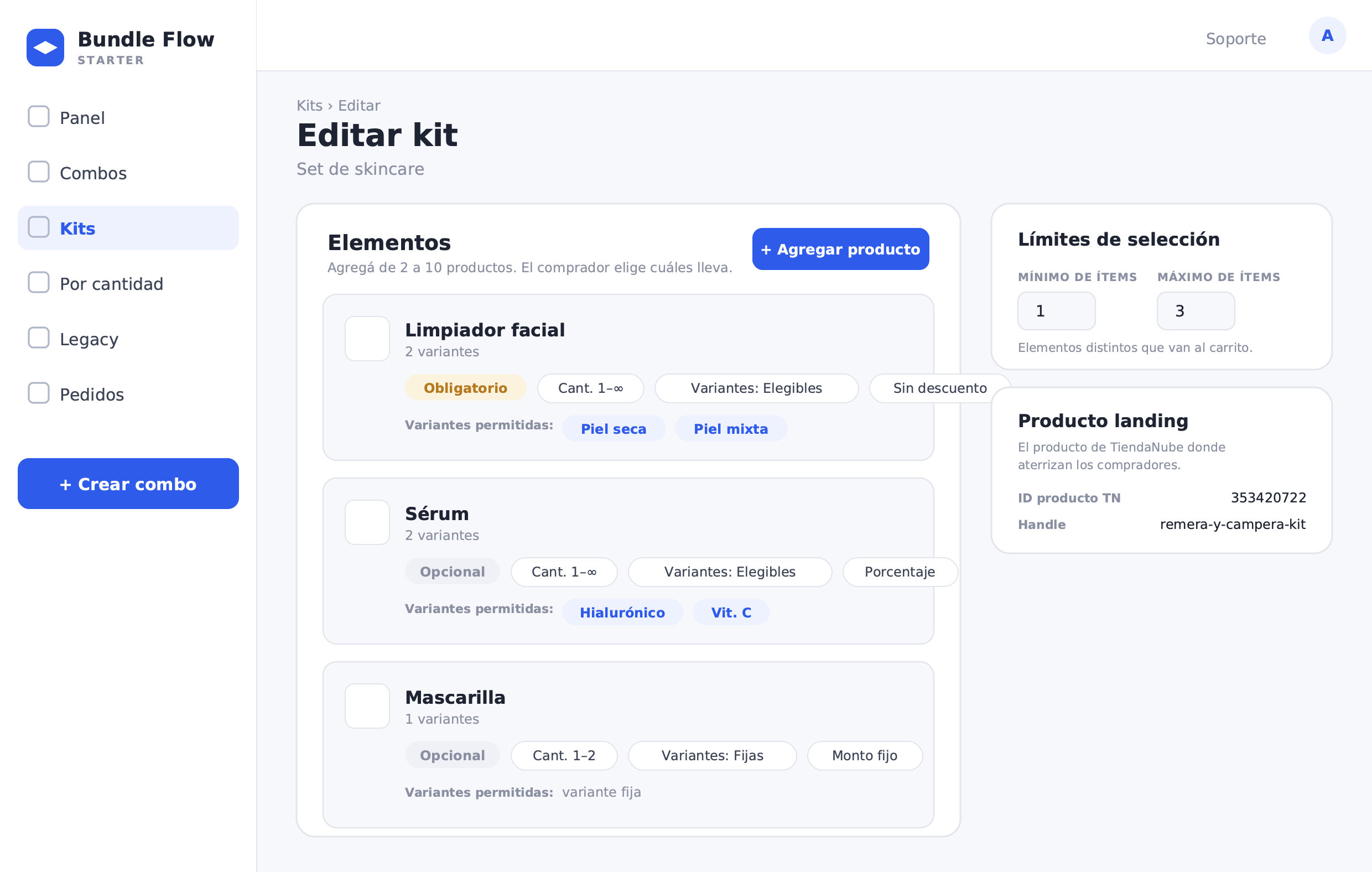
Here's the creation flow:
- In the Bundle menu, go to Kits and select Create kit (or from the combos menu, choose the Kit option). This feature is in BETA.
- Fill in the name and description of the Kit. The description is the text the shopper sees on the landing page — use it to present the set and the extras they can choose from (for example, "Your moisturizer plus the extras your skin needs, with a per-item discount").
- Add the elements of the Kit (between 2 and 10). For each element: choose the product, set it as Required or Optional, define minimum and maximum quantity, select allowed variants (skin type, if applicable), and assign the per-item discount.
- Moisturizer: Required, quantity 1, skin type as variant, 10% discount.
- Serum: Optional, quantity 1, no variant, 15% discount.
- Face mask: Optional, quantity 1, no variant, 15% discount.
- Eye contour: Optional, quantity 1, no variant, 10% discount.
- Set the selection limits: minimum 1 item (the moisturizer) and maximum 4 items.
- Adjust settings: display priority, free shipping if it applies to this Kit.
- Bundle automatically creates the landing product on TiendaNube, which serves as the entry point for the Kit in your store.
- Publish the Kit. From the panel you can pause, resume, or archive it whenever needed.
The number of Kits available depends on your plan tier.
What to measure once the Kit is live
A skincare Kit generates valuable data about customer preferences and the effectiveness of each extra. These are the most useful indicators:
Attach rate per optional product: What percentage of customers who buy the Kit add the serum? What about the face mask? The eye contour? If the eye contour has an 8% attach rate, it may not be the most compelling complement for this Kit — or it may need a higher discount.
Average items per Kit: If the average is near the minimum (1), the Kit isn't convincing customers to add extras. If it's close to the maximum (4), the per-item discounts are working and the extras are being perceived as a good purchase.
Kit revenue vs. moisturizer sold alone: Compare the ticket of a customer who bought the Kit against one who bought only the moisturizer. The difference is the incremental value the Kit is generating.
Skin-type variant popularity: Which skin type drives the highest Kit volume? That data cross-references your customer base profile and helps you manage stock before the next campaign.
Most frequent combinations: Moisturizer + serum, or moisturizer + serum + mask? The most repeated combination is the foundation of your next communication: the "most popular set" you can highlight on the landing page, on social media, or in a replenishment email.
A well-built skincare Kit isn't just a sales tool — it's a way to better understand what your customer is looking for when they already know what they need but haven't yet decided which extras to add. The Kit gives structure to that choice. And the data it generates shows you where to go next.